 Skip to main content







How Crypto Rug Pulls Actually Work (and How to Check Before You Buy)
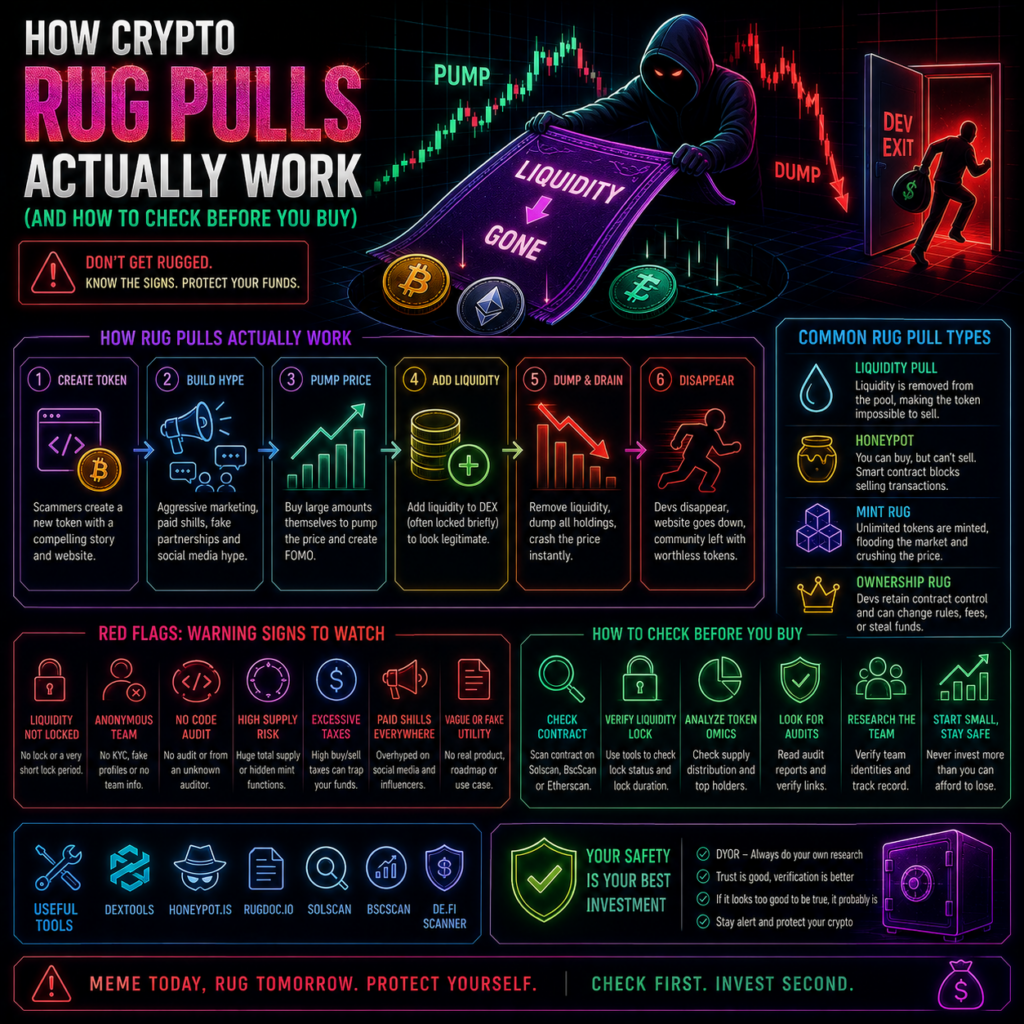
Most warnings about rug pulls stop at “be careful with new tokens,” which is true and useless. The useful version explains the machinery, because every rug pull relies on a specific power the deployer kept for themselves, and every one of those powers is visible on-chain before you buy. So how do crypto rug pulls work in practice? Three mechanisms cover almost all of them, and each has a corresponding check you can run in a couple of minutes without reading any code. Key Takeaways How do crypto rug pulls work? Three mechanisms cover most of them: liquidity draining, honeypot contracts and hidden mint functions. GoPlus Security detected over 67,000 honeypot tokens across Ethereum, Base and BNB Chain in a single quarter. Every one of these mechanisms is a permission the deployer retained, and permissions are public. CoinGecko found 68.67% of Pump.fun tokens recorded their last trade on the day they launched. Locked liquidity and renounced ownership reduce risk. Neither eliminates it. How do crypto rug pulls work? Mechanism one: draining liquidity This is the classic. To trade on a decentralised exchange, a token needs a liquidity pool, typically the new token paired with something real like ETH or a stablecoin. The deployer creates it and receives LP tokens representing their share. Buyers arrive, put ETH into the pool and take the new token out, so the pool’s ETH side grows. Then the deployer redeems their LP tokens, withdraws the accumulated ETH, and the pool is empty. Anyone holding the token now owns something with no market on the other side. The whole event can take one transaction. Nothing is hacked, because withdrawing liquidity you provided is a normal function working exactly as designed. Mechanism two: honeypot contracts A honeypot inverts the trap. You can buy. You cannot sell. The contract contains logic that reverts sell transactions, or applies a sell tax so extreme it swallows the position, or maintains an allowlist so only certain addresses can exit. The chart looks superb because it shows only buying, which is the tell once you know to look: a price line with no red candles at all. Meanwhile the deployer sells freely into the demand they have manufactured. Scale matters here. GoPlus Security reported detecting 67,241 honeypot tokens across Ethereum, Base and BNB Chain in one quarter, alongside TenArmor data putting rug pull losses on Ethereum and BSC above $45.2 million over the same period. Those figures cover Q4 2024, and we found no equivalently detailed public breakdown for 2026, so treat them as illustrating the scale of the category rather than current totals. Mechanism three: hidden mint functions The quietest of the three. The contract retains a function letting the owner create new tokens after launch. Supply looks fixed, holders assume it is, and then the owner mints a large quantity and sells it into the pool. Your tokens still exist. They are simply now a much smaller share of a much larger supply. Related permissions do similar work, and they are the least discussed part of how do crypto rug pulls work. A blacklist function lets the owner block specific wallets from transferring. A modifiable tax function lets them raise the sell fee after you are in. A pausable contract lets them freeze trading entirely. The checks you can actually run Here is the practical part, and it answers how do crypto rug pulls work from the defender’s side. Every mechanism above requires a retained permission, and permissions are readable. Start on the block explorer. Paste the contract address into Etherscan or the equivalent for the chain. A token page gives you the Contract tab, where you want to see verified source code rather than an unverified blob, and the Holders tab, where you want to see supply spread across many addresses rather than concentrated in a handful. Check ownership. In the contract’s read functions, look at the owner address. If it is the zero address, ownership has been renounced and owner-only functions can no longer be called. If a named wallet still holds it, ask what that wallet is permitted to do. Check the functions themselves. Scan the write functions for names like mint, setTax, setFee, blacklist, pause or setMaxTx. You do not need to read the code. The presence of the function tells you the power exists. Check liquidity. Locked liquidity means the deployer’s LP tokens are held in a time-locked contract or sent to a burn address, so they cannot be withdrawn until the lock expires. Look at who holds the LP tokens, when any lock ends, and how much is actually locked. Run a scanner as a second opinion. Automated tools such as GoPlus Security’s token checker and Honeypot.is, which simulates a buy and a sell to see whether selling is possible, are widely used for this. Verify any tool is live and behaving before relying on it, and never treat a single score as a verdict. What “locked” and “renounced” do not mean Both phrases get used as talismans. Renouncing ownership removes owner-only functions, but some contracts keep separate privileged roles under other names, and renouncing an implementation while retaining proxy admin rights leaves the logic changeable. Locked liquidity is only as good as its duration, and a seven-day lock on a two-hour-old pool is not reassurance. The wider context is worth holding onto. CoinGecko’s research on Pump.fun tokens found 68.67% recorded their last trade on the same day they were created, and only 4.55% survived beyond 90 days. Most tokens fail without anyone pulling a lever. Our guides on evaluating token sales and meme coins versus utility coins cover the non-technical side of that. Disclaimer: This article is for informational and educational purposes only and is not financial or investment advice, and no token or tool is endorsed. No check described here can establish that a token is safe, and contracts can change behaviour after you buy. Crypto assets are high risk and you may lose everything you put in. Do your own
Market Cap vs. Fully Diluted Valuation (FDV): Why It Matters Before You Buy
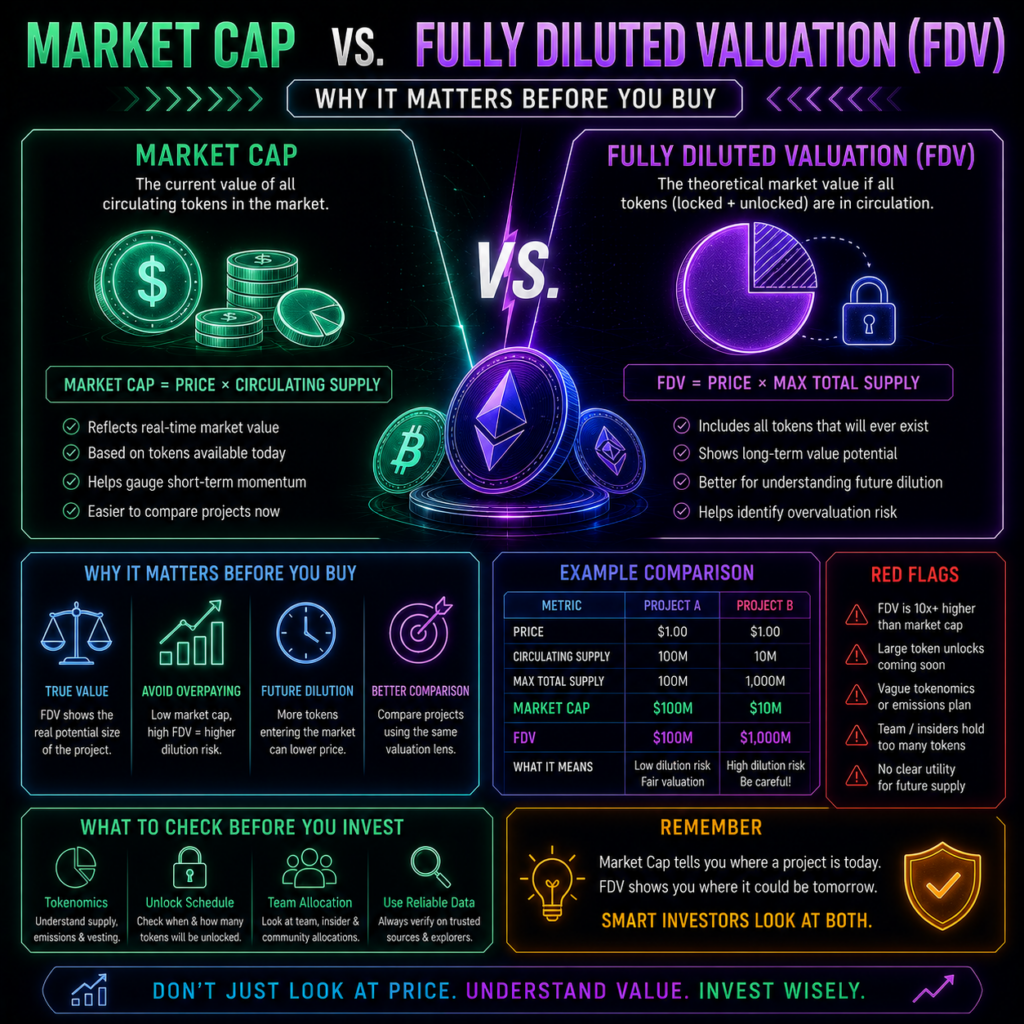
Market cap is the number every price page leads with, and on its own it can be badly misleading. It measures only the tokens circulating today. If most of a project’s supply is still locked, that figure describes a fraction of what the market will eventually have to absorb. Understanding market cap vs fully diluted valuation crypto pricing is one of the few evaluation habits that takes five minutes to learn and changes what you see on every token page afterwards. Here is the distinction, with real numbers from a live example. Key Takeaways The market cap vs fully diluted valuation crypto split is simple: market cap is price times circulating supply, FDV is price times total supply. CoinGecko’s Market Cap to FDV ratio makes the gap visible instantly. The closer to 1, the less dilution is pending. Worldcoin showed a market cap near $1.54 billion against an FDV of $4.25 billion on 28 August 2026, a ratio of 0.36. CoinGecko also publishes Outstanding Token Value, a third figure that excludes supply not planned for circulation. A low ratio is not automatically bad. It tells you to check the unlock schedule, not to avoid the token. Market cap vs fully diluted valuation crypto: the definitions Market capitalisation is the current price multiplied by circulating supply, where circulating means tokens available and tradable by the public. CoinGecko’s methodology compares it to shares readily available in a stock market, excluding those held and locked by insiders. Fully diluted valuation is the current price multiplied by total supply, which is every token that will exist. CoinGecko’s explainer is careful to note that FDV is theoretical, because increasing circulating supply may itself affect price, and that emission schedules can mean years pass before the full supply arrives. The useful shortcut is the ratio between them. A token with a Market Cap to FDV ratio near 1 has most of its supply already circulating. A ratio well below 1 means significant supply is still to come. A live example, with real figures Worldcoin makes the point cleanly because the numbers are large and public. On 28 August 2026, CoinGecko showed WLD at $0.4256, with a market cap of roughly $1.54 billion and a fully diluted valuation of $4.25 billion. Circulating supply was 3.617 billion against a total and maximum supply of 10 billion. Market Cap to FDV: 0.36. Read what that means in plain terms. About 36% of the eventual supply is trading. At the current price, the tokens not yet circulating are worth roughly $2.7 billion, and at some point they arrive. For the price to hold as they do, demand has to grow enough to absorb them. This is not a hypothetical mechanism. CoinGecko’s own news panel for the token on 28 August 2026 flagged a 2.2% drop attributed to a token unlock and low float concerns, alongside separate coverage of tokenomics and unlocks drawing market attention. The token also sits about 96.4% below its March 2024 all-time high. None of that makes the project good or bad, and this is an illustration rather than a view on it. The point is narrower: anyone who looked only at the market cap saw a $1.54 billion asset. The market has $4.25 billion of eventual claims priced into the same token. The third number almost nobody quotes CoinGecko publishes a metric between the two called Outstanding Token Value, and it is the most practical of the three. It uses outstanding supply rather than maximum supply, excluding tokens that are permanently locked, burned, or not planned for release, such as treasury reserves or foundation allocations that will never circulate. For Worldcoin on the same day, outstanding supply was 6.553 billion against a total of 10 billion, giving an Outstanding Token Value of $2.789 billion. That sits between the $1.54 billion market cap and the $4.25 billion FDV, and it is arguably the fairest of the three, because FDV assumes tokens reach the market that in some cases never will. How to actually use this Three habits turn the market cap vs fully diluted valuation crypto comparison into something useful. First, read the ratio before the price. A token at 0.1 is telling you 90% of supply is still to arrive, which is a different investment from one at 0.9. Second, find the unlock schedule, because timing matters as much as quantity: a slow release over ten years is not the same pressure as a cliff next quarter. Third, ask who receives the unlocked tokens, since early investors at a low cost basis behave differently from an ecosystem fund. A low ratio is not a red flag by itself. Most young projects have one. It is a prompt to look at the supply schedule rather than a reason to walk away, and our guides on evaluating token sales and on meme coins versus utility coins cover the wider checks. Disclaimer: This article is for informational and educational purposes only and is not financial or investment advice, and no token is endorsed or criticised. Worldcoin appears as a data illustration because its figures are public and clear, not as a recommendation either way. Crypto prices are volatile and you may lose money. Supply figures change as tokens unlock, so verify current data before relying on any of it. See our editorial policy for how we source and verify our reporting. Final Thoughts The market cap vs fully diluted valuation crypto distinction matters because the headline number is the one designed to look flattering. A project can present a modest market cap while carrying a valuation several times larger in tokens that have not arrived yet, and nothing about that is hidden. It is published on the same page, one line down. Check the ratio, then the unlock schedule, then who is receiving the tokens. It takes a couple of minutes and it is the difference between knowing what something costs and knowing what you are actually buying. Data Sources CoinGecko, Worldcoin (WLD) price, supply and valuation data,
Crypto Wallet Recovery: What to Do If You Lose Your Seed Phrase

If you are reading this because you have just realised your seed phrase is gone, here is the honest answer first, because you deserve it before anything else. In the large majority of cases, a lost recovery phrase with no backup means the funds are permanently inaccessible. Not frozen, not recoverable with the right expert, gone. There is no support line for a self-custody wallet. What follows covers the narrow situations where crypto wallet recovery seed phrase problems genuinely can be solved, how to tell those apart from the scams that will find you within days, and what to check before you conclude it is over. Key Takeaways No self-custody provider can help with crypto wallet recovery seed phrase loss. MetaMask states this plainly in its own documentation. Check whether the wallet app is still installed and you still know the password. That is the most common genuine save. If the funds were on an exchange rather than a self-custody wallet, this is account recovery and a different problem entirely. The FBI’s IC3 recorded 10,516 recovery scam complaints in 2025, with around $1.4 billion in losses. Nobody legitimate will ask for your partial seed phrase, an upfront fee, or remote access to your device. Why crypto wallet recovery seed phrase advice starts with bad news A recovery phrase is not a password stored somewhere that can be reset. It is the mathematical source of the private keys. MetaMask’s own security documentation puts it directly: the wallet is self-custodial, there is no centralised account recovery, and MetaMask cannot recover your wallet for you. That is not a policy someone can escalate. Nobody holds a copy. Any service claiming otherwise is either describing something narrower than it sounds or is lying to you. Four things to check before concluding it is gone Is the wallet still installed and unlocked? This is the one people miss, and it is the most common genuine save. Your password is not your recovery phrase, but in most wallet apps a password unlocks the app locally and lets you re-display the phrase from the security settings. If the app is still on your phone or browser and you know the password, stop reading and go write the phrase down properly now, before an update or a device failure removes the chance. Did you make a backup you have forgotten? A metal plate, a sealed envelope with a solicitor, a copy given to a partner. Worth an hour of searching before an afternoon of grief. Did you use a multi-share backup? Some hardware wallets split the backup into several shares, where a defined subset reconstructs the wallet. Trezor’s current lineup lists multi-share backup across its Safe models. If you set this up, losing one share is survivable by design. Do you have most of the words? Recovery phrases include a checksum, so a phrase missing one or two words has a finite search space rather than an infinite one. This is the one genuine partial crypto wallet recovery seed phrase route, and open-source tools for it exist. The critical rule: run anything like that offline, on a device you control, and never type any part of a phrase into a website or send it to anyone. A partial phrase in the wrong hands is still a serious exposure. If it was an exchange, this is a different problem Plenty of people searching for crypto wallet recovery seed phrase help do not actually have a self-custody problem. If your coins were sitting on a centralised exchange, you never had a seed phrase for them. The exchange holds the keys, and what you have lost is access to an account. That is recoverable through the exchange’s published identity verification process, which usually means documents and a wait. Go through the app or a bookmarked URL. Do not search for a support number, because those results are seeded with fakes. Our guides to using MetaMask and opening Trust Wallet explain which holdings sit in which category. The recovery services that will find you This is the part to read even if nothing above applies. Recovery scams are not a fringe risk. According to the FBI’s 2025 Internet Crime Report, published in April 2026, IC3 received 10,516 complaints about recovery scams with roughly $1.4 billion in reported losses. The FBI’s public service announcement on fictitious law firms targeting crypto victims sets out the pattern: fraudsters target people who have already lost money, exploit the emotional need to recover it, and create a false sense of safety by impersonating or claiming affiliation with government bodies. It is the third such advisory the IC3 has issued on this scheme. The 2026 update is worse. The FBI has warned that criminals now impersonate FBI and IC3 staff directly, using synthetic video, spoofed government websites and fake social accounts, often moving contact from Facebook Messenger to Telegram. The IC3 has stated it does not have social media accounts, does not communicate through messaging apps, and never charges fees to recover stolen money. We have deliberately named no private recovery service here, because alleging fraud against a specific company requires proof we do not have. Judge by behaviour instead. Any of these means walk away: an upfront fee, a request for your seed phrase or any part of it, a request for remote access to your device, an unsolicited approach, or a promise of a specific outcome. Disclaimer: This article is for informational and educational purposes only and is not financial, legal or technical advice. Self-custody means losses are generally permanent and irreversible, and no method described here is assured to work. Do not share your recovery phrase or any part of it with anyone. If you believe you have been targeted by fraud, report it to your national reporting body and consider speaking to a qualified professional. See our editorial policy for how we source and verify our reporting. Final Thoughts Most crypto wallet recovery seed phrase searches end somewhere painful, and pretending otherwise wastes
Best Crypto Leverage Trading Platforms in 2026

Comparing leverage venues on headline maximum leverage is the wrong test, and it is the one every roundup runs. A platform offering 100x is not more useful than one offering 20x if you cannot see how it decides to close you out. The variable that actually separates the best crypto leverage trading platform options in 2026 is documentation: whether the venue publishes its liquidation formula, its maintenance margin schedule and its fee on forced closure, or whether you discover those in a support ticket afterwards. This report compares two venues that publish everything, and covers who can legally access them. Key Takeaways Before picking a best crypto leverage trading platform, check access: UK retail consumers cannot legally be sold crypto derivatives, banned since 6 January 2021. Hyperliquid publishes its exact liquidation price formula, its maintenance margin rates and its backstop process in public documentation. Its maximum leverage varies by asset from 3x to 40x, with maintenance margin between 1.25% and 16.7%. Kraken caps spot margin at 5:1, issues margin calls at an 80% margin level and liquidates at 40%. Kraken charges a 2% fee on automatic liquidations. Hyperliquid states it charges no clearance fee at all. Start with whether you can legally use it This section usually appears last or not at all, which is backwards for a UK audience. The FCA prohibited the sale, marketing and distribution of crypto derivatives to all UK retail consumers from 6 January 2021, in Policy Statement PS20/10, reasoning that retail consumers cannot reliably assess the value and risks of these products. Perpetual futures are derivatives. So for UK retail readers, most of what a best crypto leverage trading platform roundup recommends is not lawfully available, whatever an offshore venue’s geoblocking does or does not do. Spot margin sits in a different category but carries its own eligibility criteria. Check your own position before anything below is actionable. Maximum leverage, and why the number misleads Hyperliquid’s liquidation documentation states that maximum leverage varies by asset from 3x to 40x, and that maintenance margin is half the initial margin at maximum leverage. That produces a maintenance margin between 1.25% for 40x assets and 16.7% for 3x assets. Kraken sits at the other end. Its spot margin caps at 5:1, and its margin documentation notes that larger profits and losses come from position size relative to collateral rather than the leverage level selected. That is what the headline number obscures. A 40x cap does not make a position 40 times riskier; it sets a ceiling, and for a given position size a higher leverage setting leaves more free margin and a larger buffer. Risk comes from how much you open, which is the single most useful thing to know when picking a best crypto leverage trading platform. Funding and the cost of holding Perpetual venues charge funding rather than interest, and Hyperliquid settles it hourly against margin. Over a multi-day position with one-sided funding, that carry can exceed the price move you were trading. Its margin tiers documentation publishes the maintenance margin formula, with the rate at each tier equal to half the initial margin rate at that tier’s maximum leverage, so at 20x the rate is 2.5%. Kraken’s cost structure differs in kind. Spot margin carries opening and rollover fees rather than funding, and its automatic index-price liquidations attract a 2% liquidation fee on top of the loss. Hyperliquid’s documentation states there is no clearance fee on liquidations, unlike centralised exchanges. On a forced closure that gap is real money, and it belongs in any best crypto leverage trading platform comparison. Liquidation transparency: the real best crypto leverage trading platform test Here Hyperliquid sets a standard the industry has not matched. Its documentation publishes the exact liquidation price formula rather than a description of one, defines maintenance leverage per margin tier, and sets out the sequence step by step. Positions below maintenance margin are first sent to the order book as full-size market orders, and if the requirement is met, remaining collateral stays with the trader. Only if account equity falls below two thirds of maintenance margin without a successful book liquidation does a backstop liquidation occur through the liquidator vault, and there the maintenance margin is not returned. Positions over 100,000 USDC are partially liquidated at 20% first, with a 30-second cooldown. Liquidations use a mark price combining external exchange prices with Hyperliquid’s own book. Kraken publishes its equivalents too, which is why both appear here. Its margin call and liquidation page gives the margin call level at 80%, liquidation at 40%, a worked example, and two details worth knowing: positions close first in, first out regardless of whether one is in profit, and margin call notifications are explicitly not assured. Both of those are more disclosure than most venues offer. If a platform you are considering will not tell you its liquidation formula, its maintenance margin schedule and its liquidation fee, that absence is the finding. What to check before funding an account Four questions, in order. Can you lawfully use the product where you live? Is the liquidation formula published, or only described? What does forced closure cost as a separate fee line? And what does holding for a week cost in funding or rollover, since that is where a correct directional call still loses money. Our overview of crypto trading brokers covers unleveraged alternatives, and our coverage of crypto volatility in 2026 shows how fast the moves that trigger liquidations arrive. Disclaimer: This article is for informational and educational purposes only and is not financial or investment advice, and no platform is endorsed or recommended. Leveraged trading carries a high risk of losing your entire position quickly and without warning. Crypto derivatives cannot lawfully be sold to UK retail consumers, and availability, eligibility and rules vary by jurisdiction and change. Verify current terms with the platform and consider speaking to a qualified professional. See our editorial policy for how we source and verify our reporting. Final Thoughts Ranking the best
Buying Bitcoin Instantly Without ID: What’s Actually Possible and the Real Risks
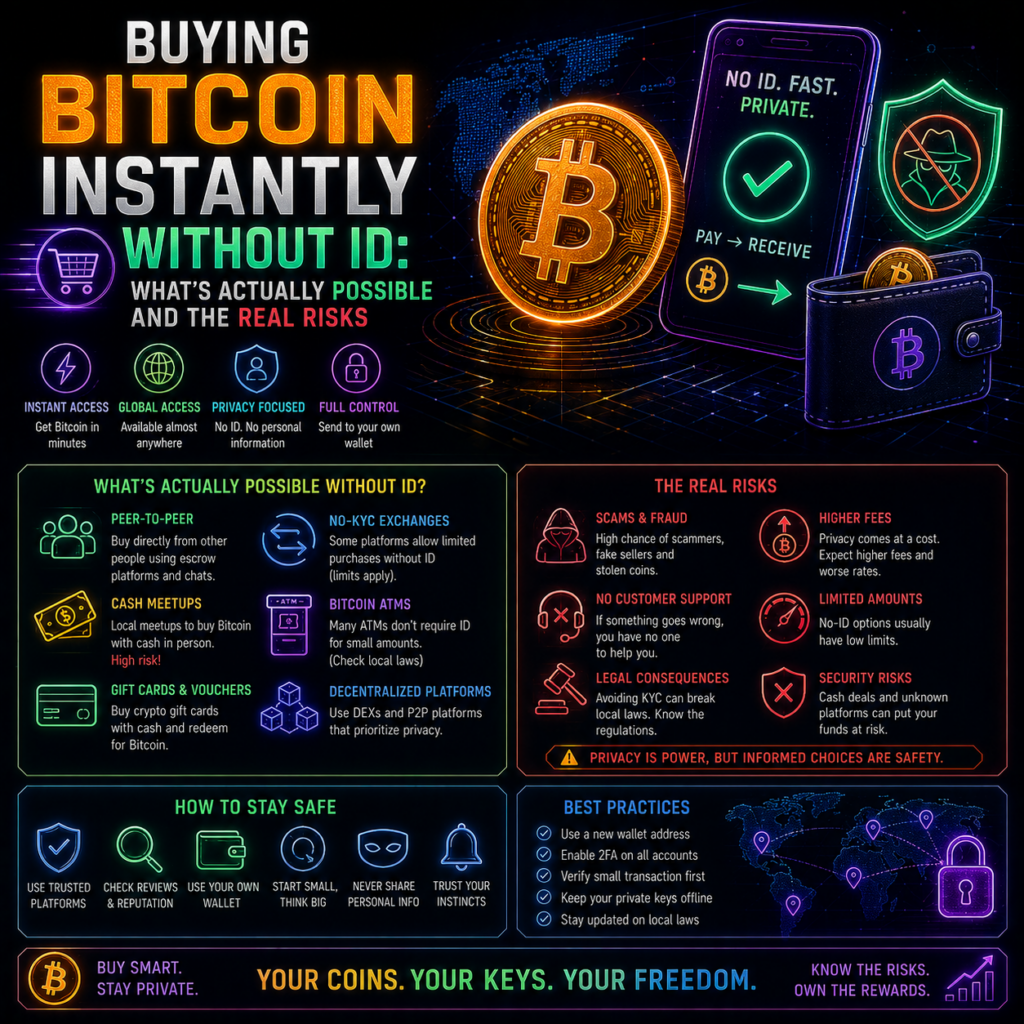
The search for how to buy bitcoin instantly without id usually turns up three suggested routes: crypto ATMs, peer-to-peer traders, and services promising verification-free purchases. In the UK, as of 2026, the regulator has effectively closed all three, and it has said so in unusually plain language. That is not a moral argument, it is a factual one, and it changes what the honest answer looks like. Here is what the FCA has actually said, what the loss data shows, and what the fee premium really is. Key Takeaways The FCA states that no registered cryptoasset firm is approved to offer crypto ATM services, so any UK crypto ATM is operating illegally. In April 2026 the FCA confirmed there are currently no FCA-registered peer-to-peer crypto businesses operating in the UK. The FCA’s first crypto ATM prosecution documented markups of 30% to 60% on crypto sold through the machines. FBI data showed more than 13,400 crypto kiosk complaints and over $388 million in reported losses in the US during 2025. Personal peer-to-peer trades need no FCA registration. Doing it by way of business without registration does, and is illegal. Can you buy bitcoin instantly without id in the UK? The short answer Regulators are often vague. Not here. In its warning on illegal crypto ATMs, the FCA states that none of the cryptoasset firms registered with it have been approved to offer crypto ATM services, which means any operating in the UK are doing so illegally and consumers should not use them. Enforcement has followed. In a continued crackdown, the FCA and partners disrupted 26 machines operating unlawfully, inspecting 18 sites over May and June alongside regional organised crime units. Steve Smart, the FCA’s joint executive director of enforcement, put it directly: use a crypto ATM in the UK and you are using a machine operating illegally, you may be handing your money to criminals, you will not be protected if something goes wrong, and you will probably not be able to contact the operator at all. That last point matters more than it sounds. Anyone researching how to buy bitcoin instantly without id is usually weighing convenience against paperwork. The trade being offered here is convenience against having nobody to call. Peer-to-peer, and the line that actually matters P2P is the route most often recommended, and the FCA addressed it directly in April 2026. Its first crackdown on illegal peer-to-peer crypto trading, run with HMRC and the South West Regional Organised Crime Unit, targeted eight London premises, issued cease and desist letters at each, and produced evidence now supporting several criminal investigations. The line the FCA draws is worth understanding properly, because it is the crux of whether you can buy bitcoin instantly without id here at all. Peer-to-peer transactions on a personal basis need no registration. Doing it by way of business does, and the release states plainly that there are currently no FCA-registered peer-to-peer crypto businesses operating in the UK. So the trader offering to sell you Bitcoin for cash, as a business, is by definition unregistered. Detective Inspector Ross Flay of SWROCU described why enforcement targets them: these traders provide a route for criminals to move, disguise and spend illegal money. If you buy from one, you are transacting inside that route whether or not you know it. The fee premium nobody advertises The short version: choosing to buy bitcoin instantly without id costs more. The specific number comes from the FCA’s first criminal prosecution here, where the operator of an unregistered ATM network was found to have taken markups of 30% to 60% on the crypto sold through the machines, and was sentenced to four years. Blockchain intelligence firm TRM Labs covered the case and noted crypto ATMs have shown roughly double the illicit activity rate of the wider crypto economy. Compare that with a registered exchange, where the equivalent spread is usually a fraction of a percent to a few percent. On a 500 pound purchase, a 40% markup is 200 pounds. That is the actual price of skipping verification, and it is not disclosed at the machine. What the loss data shows The US, which hosts most of the world’s crypto ATMs, publishes the clearest numbers. Reported in August 2026, FBI data recorded around 13,460 crypto kiosk-related complaints during 2025 with more than $388 million in reported losses, a 23% rise in complaints and a 58% rise in losses year on year. People aged 60 or over filed 6,188 of those complaints and reported more than $257 million. Two caveats. The FBI notes actual losses are likely higher because many victims do not report, and its figures include other payment channels, so the full $388 million cannot be attributed to ATM deposits alone. Even discounted, the direction is unmistakable. So what is actually possible Less than the search results suggest. If you already hold crypto, decentralised exchanges let you swap without an account. But converting cash or a bank balance into Bitcoin without identity verification has no legal route at a UK venue in 2026, and the illegal routes carry a documented markup, no recourse, and active enforcement. If your motivation is privacy from data brokers rather than avoiding obligations, that is a coherent concern with a real cost attached. The FCA’s Firm Checker lets you confirm whether any provider is registered before you hand over money, which takes about a minute. Our guides to buying crypto and choosing a broker cover the regulated route. Disclaimer: This article is for informational and educational purposes only and is not financial, tax or legal advice, and nothing here encourages evading identity, reporting or tax obligations, or using unregistered providers. Crypto is high risk and largely unregulated in the UK except for anti-money laundering and financial promotion rules, so you are unlikely to have protection if something goes wrong. Rules differ by country and change. Do your own research and consider speaking to a qualified professional. See our editorial policy for how we source and verify
How to Accept Crypto Payments on Your Website: A Beginner’s Guide
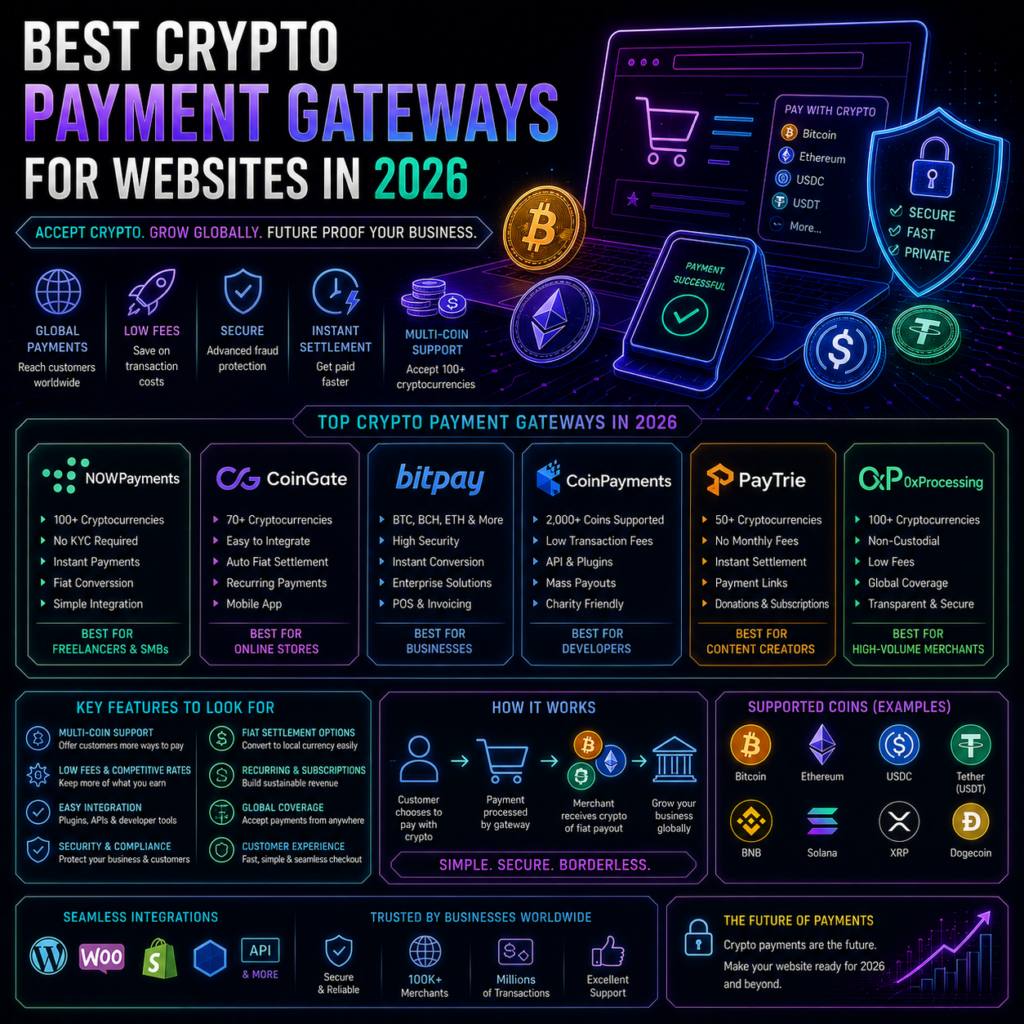
Working out how to accept crypto payments on website checkout sounds like a technical problem and mostly is not. The integration is the easy part, usually a plugin and an API key. The decisions that matter come before and after: which currency you want to hold, and how you record it all when the tax year closes. This guide runs the sequence in order, using a real gateway’s published setup steps, and assumes no coding knowledge. Key Takeaways How to accept crypto payments on website checkout comes down to a plugin, an API key and a settlement currency setting. No code required. CoinGate’s published WooCommerce steps run to seven items and use a free plugin from the WordPress directory. Auto-converting to fiat removes price risk. Holding crypto keeps it. Decide this before you switch anything on. Test in a sandbox first, using separate credentials, because production API keys will not work there. The IRS treats crypto received for goods or services as ordinary income at its value when received. Step one: pick a gateway, and pick it on settlement Gateways differ on fees, supported coins and integrations, but the question that should drive your choice is what lands in your account. Some settle to your bank in fiat, some pay you in crypto, some do either depending on your setting. Also check whether the gateway is custodial. Most hold your funds between checkout and payout, which is what makes fiat settlement and refunds possible. Self-hosted processors never touch your money, but you run the software. Neither is better in the abstract; it depends on whether you have technical staff. Step two: how to accept crypto payments on website checkout, step by step Here is what the process actually looks like, taken from CoinGate’s official WooCommerce plugin repository, which publishes its installation steps in full. Before touching your site you create an account and, to test first, a separate one in the sandbox. That second account matters: the documentation is explicit that live credentials will not work in the sandbox. You then generate API credentials, via the auto-setup wizard or by opening the API tab, clicking Apps, then New App, and set your settlement currency. The WordPress side is seven steps and no code. Plugins, Add New, search for the gateway’s plugin, install, activate. Open WooCommerce, Settings, Payments, find the crypto method and tick Enabled. Click into it to adjust the title and description customers see. Paste your API credentials. Map the gateway’s order statuses to WooCommerce’s, leaving defaults if unsure. Turn Test Mode on if using sandbox credentials. Save. That is it for a standard store. The same repository sets out what customers get: payment in 15 or more cryptocurrencies including Bitcoin, Ethereum, USDC and Litecoin, across networks including Polygon, Arbitrum, Base, Optimism and Solana. Step three: decide what happens to volatility This choice separates merchants who find crypto payments boring from merchants who find them stressful, and it is the step most guides on how to accept crypto payments on website checkout skip. Auto-conversion locks an exchange rate at checkout and converts immediately, so a 100 euro order is 100 euros of value whatever the coin does afterwards. CoinGate’s own worked example describes exactly this: a customer pays the crypto equivalent of a 100 euro order at real-time rates, roughly 99 euros lands in the merchant account after fees, withdrawable to a bank in EUR, USD or GBP. Holding means keeping the coin and carrying the price risk. That is a treasury decision, not a payments one, and it belongs to whoever manages cash flow rather than whoever builds the site. A middle path has become common: settle into stablecoins, removing day-to-day volatility without an immediate trip through the banking system. Our coverage of stablecoin usage in 2026 covers why more businesses choose it. Whichever you pick, crypto payments are final. No chargebacks removes a familiar cost and a familiar safety net, so refunds become something you handle directly. Step four: records and tax, from day one This is the part merchants postpone and regret. In the US, the IRS FAQs on digital asset transactions state that receiving digital assets in exchange for providing services is ordinary income, measured at the fair market value in US dollars when received. Digital assets are treated as property, so if you hold the coin and later convert it, that disposal is a separate taxable event with its own gain or loss. The same FAQs set out the recordkeeping requirement: keep records sufficient to establish the positions taken on your return, including receipts, sales, exchanges, dispositions, transfers and fair market value. In practice: date, amount received, dollar value at the time, and transaction reference, for every order. Good gateways help. The CoinGate repository lists exportable accounting and payout reports among its features, worth confirming before you commit, because reconstructing a year of on-chain payments by hand is miserable. Rules vary by country, so take the filing to an accountant. Disclaimer: This article is for informational and educational purposes only and is not financial, tax, legal or business advice, and no provider is endorsed. Accepting crypto exposes a business to price volatility and to irreversible settlement with no chargeback protection. Tax treatment and licensing requirements vary by jurisdiction and change. Setup steps and fees may differ from those published when this was written, so confirm directly with your provider, and consult a qualified accountant about your obligations. See our editorial policy for how we source and verify our reporting. Final Thoughts The honest summary of how to accept crypto payments on website checkout in 2026 is that the technical barrier has largely gone. A merchant with a standard store and no developer can be live in an afternoon, and much of that afternoon is account verification rather than configuration. What is left is the two decisions the plugin cannot make for you. Settle your settlement currency before enabling anything, because changing your mind later means unpicking bookkeeping. And set up record-keeping on day
Crypto Payment Gateways for Websites in 2026: How to Choose

Choosing the best crypto payment gateway for website checkout is a procurement decision, not a trading one, and the headline rate is the least useful number in it. Every gateway advertises a percentage. What actually determines your cost is what happens after the payment lands: which currency you end up holding, what it costs to move it into your bank, and how much engineering time the integration consumes. This piece sets out the three questions that decide it, with a fully documented worked example showing how a 1% headline becomes something else. Key Takeaways Picking the best crypto payment gateway for website checkout comes down to three variables: settlement currency, total fee stack, integration effort. CoinGate’s published standard rate is 1% per transaction with no monthly or setup fees, per its own pricing page. The same page lists crypto payouts at 0.50 EUR plus 0.5%, a 50 EUR minimum withdrawal, and 0.50% on SWIFT. Custodial gateways hold your funds between checkout and payout. Self-hosted processors like BTCPay Server never do. We only publish fee figures readable on a provider’s own page, so this best crypto payment gateway for website guide documents one in full rather than ranking five. Question one: which currency do you want to hold? Everything else follows from this, and most merchants answer it by accident. Settle in crypto and you carry price risk from the sale until you convert. Fine if you intend to hold, a problem if your suppliers invoice in pounds. Settle in fiat and the gateway converts for you, so you are paying a spread somewhere whether or not it appears as a line item. A third option has become common: settle in stablecoins, removing volatility without an immediate trip through the banking system. Our coverage of stablecoin usage in 2026 covers why more businesses choose that middle path. Answer this before comparing rates: a gateway that is cheap in crypto and expensive on fiat payout is only cheap for one kind of business. Question two: what does the whole fee stack cost? Here a documented example beats a comparison table. CoinGate’s pricing page, last modified 28 May 2026, publishes its full schedule rather than a headline, which makes it the clearest illustration of how these products actually charge. The standard plan is 1% per transaction, with no monthly fees and no setup or integration fees. That is the number every comparison quotes. The same page then lists the rest: crypto payouts at 0.50 EUR plus 0.5%, or 0.50 EUR plus 1.5% if the payout involves conversion. Crypto and SEPA withdrawals are free but carry a 50 EUR minimum. SWIFT withdrawals cost 0.50%. Manual currency exchange on the platform costs 1%, though automatic conversion at checkout is excluded. Refunds cost 0.25 EUR plus 0.1%. Settlements run weekly by default. Work that through. On a 200 EUR order the processing fee is 2 EUR. Take the funds out as crypto and add 0.50 EUR plus 0.5%. The 50 EUR withdrawal minimum means low-volume sellers leave balances on the platform rather than sweeping them daily. None of it is hidden, and CoinGate deserves credit for publishing it, but it is the difference between a 1% product and a 1% cost. Run the same exercise on any gateway you shortlist: ask for the payout fee, withdrawal minimum, conversion spread and refund charge, then compare. Question three: how much engineering will it take? Integration splits into three tiers, and choosing wrong costs time rather than fees, which is the part a best crypto payment gateway for website comparison usually ignores. The lightest option is a hosted checkout or payment link, which needs no development at all. Next is a platform plugin: CoinGate publishes a WooCommerce plugin alongside PrestaShop, OpenCart, WHMCS and Wix integrations, and most established gateways offer a comparable set. If you run a standard e-commerce stack, this is usually a configuration job rather than a build. The heaviest is a direct API integration, needed for custom checkouts, subscription billing or marketplace splits. CoinGate’s developer documentation shows what to expect: an API, webhooks for payment status, a sandbox. Budget developer time for webhook handling and reconciliation rather than the payment call itself, because that is where the work is. One structural point before you shortlist. Custodial gateways hold your money between checkout and payout, which is what lets them offer fiat settlement and refunds. Self-hosted processors such as BTCPay Server, which the project describes as free, open-source and non-custodial with payments going straight to your own wallet, charge no processing fee at all. The cost moves to hosting and maintenance, so that model suits merchants with technical staff rather than those without. What we could not verify, and why it matters A note on method, because it affects how to read any gateway comparison including this one. Most published rankings are written by gateway companies about their competitors. We found rankings hosted by at least five processors, each concluding the host was cheapest. We opened and read CoinGate’s full schedule at source. We could not do the same for several other providers’ current pages, so we have not published their fee figures rather than repeat numbers from a competitor’s blog. Ask each shortlisted provider for its schedule in writing, and note that published rates move, which is why the figures here carry a date. Disclaimer: This article is for informational and educational purposes only and is not financial, tax, legal or business advice, and no provider is endorsed. Accepting crypto exposes a business to price volatility, chargeback-free but irreversible settlement, and tax and accounting obligations that vary by jurisdiction. Fees and terms change. Confirm current pricing directly with any provider and consult a qualified professional before integrating. See our editorial policy for how we source and verify our reporting. Final Thoughts The honest answer to which is the best crypto payment gateway for website use is that it depends on one thing most merchants have not decided yet: what currency they want in the account
No-KYC Crypto Exchanges in 2026: What Is Actually Available

Search for a no KYC crypto exchange list and you get two very different things presented as one category. On one side are decentralised exchanges, which are software and have no account to open, so identity verification never enters the picture. On the other are custodial companies advertising verification-free tiers up to some withdrawal threshold. Those are not variations on a theme. They differ in who holds your money, what recourse you have, and how long the arrangement is likely to last. This piece separates them, with current data for the first category and an honest account of why the second is shrinking. Key Takeaways Any honest no KYC crypto exchange list starts with DEXs, which need no identity check because there is no account and no custodian. DefiLlama tracked $9.95 billion in DEX volume over 24 hours across 783 protocols on 28 August 2026. Custodial exchanges with verification-free tiers still hold your assets and can freeze, restrict or close accounts. The EU’s Anti-Money Laundering Regulation bans regulated providers from maintaining anonymous crypto accounts from July 2027. This article does not publish withdrawal thresholds for custodial platforms, and the reason is explained below. The distinction most articles blur A centralised exchange is a business. It takes custody of your assets, matches your trades on its own books, and operates under whatever licensing its jurisdiction requires. Verification exists because the company has legal obligations to know who its customers are. A tier that skips it is a policy choice the company made and can reverse tomorrow. A decentralised exchange is a smart contract. You connect a wallet you control, the contract executes a swap, and your assets never leave your custody. There is no account because there is no company holding anything. That is not a loophole or a privacy feature bolted on. It is what non-custodial means. The practical consequence: on a DEX, nobody can freeze your funds because nobody has them. On a custodial platform with a no-verification tier, somebody has them and can freeze them, and the absence of ID makes recovery harder rather than easier. If you want the regulated comparison, our overview of the exchanges defining the industry covers that side. The real no KYC crypto exchange list: non-custodial venues This is where any honest no KYC crypto exchange list actually lives, and it is not small. DefiLlama’s DEX volume dashboard, checked 28 August 2026, recorded $9.95 billion in spot DEX volume over 24 hours and $191.9 billion over 30 days, across 783 tracked DEX protocols. The largest by 24-hour volume were Uniswap at $2.72 billion across 47 chains, Pump at $1.46 billion, PancakeSwap at $914 million across 12 chains, Aerodrome at $520 million and Orca at $365 million. Over 30 days, Uniswap processed $50.5 billion and PancakeSwap $25.2 billion. Order-book venues appear too, with Hyperliquid at $253 million in 24-hour spot volume. None of these asks who you are, because none of them can. What they do ask, implicitly, is that you understand what you are signing. Every risk we covered in our piece on choosing where to trade still applies, plus smart contract risk and the permanence of on-chain error. The awkward part: you still need to get in Here is the constraint no amount of platform-hunting removes, and it is missing from every no KYC crypto exchange list we found. A DEX swaps one crypto asset for another. It cannot turn your bank balance into crypto. Fiat on-ramps at regulated providers require identity verification, and that is the step with no realistic workaround in 2026. So the practical position: non-custodial trading without ID is genuinely available and widely used, while verification-free entry from a bank account is not. Anyone promising otherwise is describing either a custodial service that will ask eventually, or one operating outside the rules of wherever you live. Why we do not publish custodial no-KYC thresholds Most competing pages build their no KYC crypto exchange list around exactly this: custodial platforms and the amounts you can withdraw before ID is required. We have not included those figures, and the reasoning is worth stating openly rather than quietly omitting. Those thresholds change without notice, so a published figure is wrong within weeks and readers act on stale information. The category is also contracting rather than growing: eXch, a no-verification swap service, shut down effective 1 May 2025 after declining requests to block funds from the Bybit theft. A list of such venues is a list of businesses with unusually short and unpredictable lifespans, and readers who route funds through one on our recommendation carry that risk. There is a third reason. Publishing a table of withdrawal ceilings is functionally a guide to staying below identity checks, which is a different product from explaining how custody models differ. Our editorial policy commits us to the second and not the first. The direction of travel Jurisdiction matters more than platform choice, and the rules are tightening. The EU’s Anti-Money Laundering Regulation, Regulation 2024/1624, prohibits regulated crypto-asset service providers from maintaining anonymous accounts from July 2027, as The Crypto Times reported in June 2026. Those duties fall on service providers rather than individuals holding their own keys, which is precisely why the non-custodial and custodial categories are diverging rather than converging. DefiLlama now maintains a MiCA tracker covering which assets and issuers meet European requirements, which is a reasonable place to check jurisdiction-specific status before assuming a platform is available to you. One more thing that does not change with platform choice: tax. A swap is generally a disposal of whatever you swapped, and reporting obligations do not depend on whether anyone checked your passport. Disclaimer: This article is for informational and educational purposes only and is not financial, tax or legal advice, and nothing here encourages evading identity, reporting or tax obligations that apply to you. No platform is endorsed. Rules differ significantly by country and change over time. Decentralised trading carries risks including total loss with no recourse. Do your own
Crypto Airdrop Farming: Legitimate Strategy or Waste of Time in 2026?

Crypto airdrop farming has an unusual problem: the successes are extremely visible and the failures are invisible. Nobody posts a screenshot of the six months they spent bridging small amounts across a testnet for a token that never arrived. So the honest way to assess whether it is worth your time in 2026 is to look at one case where it paid extraordinarily well, one where it did not pay at all, and then at the distribution underneath the headline numbers. That third part is where most of the answer lives. Key Takeaways Hyperliquid distributed roughly 310 million HYPE, about 31% of supply, to around 94,000 wallets in November 2024. The median recipient got about 64.5 tokens, while the average was 2,915, so headline averages are badly skewed. OpenSea postponed its SEA token indefinitely in March 2026, ending its rewards programme without a new launch date. Farmers who spent months qualifying for SEA received fee refunds rather than tokens. The realistic question is not whether crypto airdrop farming can pay, but what a typical participant receives. What crypto airdrop farming actually involves Farming means using a protocol before it has a token, hoping that usage is later rewarded with one. In practice: bridging funds, making swaps, providing liquidity, testing a testnet, or accumulating points in an official programme. The costs are real, in gas fees, capital tied up and time. Projects encourage it because early usage makes a network look alive and distributes tokens to people who might stay. Nobody is obliged to reward anyone, and there is no commitment that a token will exist. That asymmetry is the whole risk. The case that paid: Hyperliquid On 29 November 2024, Hyperliquid distributed approximately 310 million HYPE, roughly 31% of a fixed one billion supply, to around 94,000 wallets that had used its testnet and mainnet. As CoinGecko’s analysis noted, the distribution was unusually generous because Hyperliquid had taken no private investment, so there was no venture allocation competing with the community share. It has also held up. HYPE was trading around $81 on DL News’s price ticker on 27 August 2026, well above its launch level. For anyone who used the platform seriously through 2023 and 2024, this was the single best outcome crypto airdrop farming has produced. The case that did not: OpenSea’s SEA Now the other side. DL News reported on 17 March 2026 that OpenSea’s long-awaited SEA token had been delayed from its scheduled 30 March launch, with no new date announced. Chief executive Devin Finzer cited challenging market conditions, writing that a delay is a delay and that when the Foundation sets a new timeline it will be deliberate and specific. The context matters for anyone weighing crypto airdrop farming now. SEA was announced in October, users spent months accumulating eligibility through the platform’s rewards waves, and that programme was then wound down. Participants were offered refunds on platform fees from certain waves, with the trade-off that a refund meant forfeiting accumulated rewards. Meanwhile the NFT market had shrunk to around $1.7 billion from a 2022 peak above $17 billion, per CoinGecko data cited in the same report. Nobody was defrauded. The token may still launch. But months of activity produced a fee refund rather than an asset, which is a realistic outcome that rarely features in farming guides. The number that reframes everything Here is the part that changes how you should read any success story. Hyperliquid’s average allocation was about 2,915 HYPE, a figure quoted widely at the time. The median was 64.53. According to on-chain analysis published by PANews in December 2024, roughly 56.6% of recipients received 100 tokens or fewer, and 83.9% received fewer than 1,000. The average was pulled upward by a small number of very large recipients, including one address that received close to a million tokens. So in the most generous airdrop of recent years, the typical participant received a few hundred dollars rather than tens of thousands. Not nothing, and it may well have exceeded their costs. Just a different proposition from the headline. When it makes sense, and when it does not Crypto airdrop farming is reasonable when the activity has standalone value. If you would use a decentralised exchange anyway, doing it on a protocol without a token costs you nothing extra and any distribution is a bonus. That is the version worth doing. It stops making sense when the activity exists solely to qualify. Manufactured transactions cost gas, tie up capital and are increasingly filtered out, since projects now screen for sybil patterns and thin repetitive activity is what those filters catch. Committing real capital to an unannounced token is speculation on something with no stated terms. If you want to see what is currently active, our upcoming airdrops page tracks specific opportunities, and our airdrop overview for 2026 covers the mechanics of claiming. Disclaimer: This article is for informational and educational purposes only and is not financial or investment advice, and no project or strategy is endorsed. Airdrops are not promised or assured, tokens may never launch, and any distribution may be worth far less than the time and fees spent qualifying. Airdrops may also be taxable on receipt in your jurisdiction. Do your own research and consider speaking to a qualified professional. See our editorial policy for how we source and verify our reporting. Final Thoughts Crypto airdrop farming in 2026 is neither a scam nor a reliable income. It is a lottery with a positive expected value for people who were going to use the protocols anyway, and a poor one for people manufacturing activity they do not otherwise want. The two cases here bracket the range honestly. Hyperliquid rewarded genuine early users generously, and the token has held its value. OpenSea’s farmers got a fee refund and an indefinite wait. Both were plausible bets at the time, which is exactly the point. Size your effort for the OpenSea outcome and treat a Hyperliquid outcome as the surprise, rather than the
Cold Wallet vs Hot Wallet: Which One Do You Actually Need?

The cold wallet vs hot wallet question usually gets answered as “cold is safer, so use cold.” That is not wrong, but it skips what matters: safer against what, and at what cost to actually use your crypto. A hardware wallet in a drawer protects you from a drained browser extension. It does nothing about a lost recovery phrase, and it makes a Tuesday afternoon swap annoying. Here is a plain framework for deciding in 2026. Key Takeaways Hot wallets keep keys on an internet-connected device. Cold wallets keep them on one that never goes online. MetaMask’s own security guidance suggests a hardware wallet once a wallet holds high-value assets. Neither protects you from losing your recovery phrase or approving a malicious transaction. The cold wallet vs hot wallet answer depends on how much you hold, how often you transact, and what you are defending against. Most people end up using both, with different amounts in each. Cold wallet vs hot wallet: what each one is A hot wallet stores your private key on a device connected to the internet: a browser extension, a phone app, an exchange account. MetaMask and Trust Wallet are the common examples, and we cover using MetaMask in 2026 and opening Trust Wallet in 2026 separately. A cold wallet keeps the key on dedicated hardware that never connects. Your computer builds a transaction, passes it to the device, and the device signs it internally and returns only the signature. Trezor’s current lineup uses secure element chips certified to Common Criteria EAL6+ with open-source firmware, which is the general shape of these devices. Worth being precise: both are self-custodial, and both back up to the same kind of recovery phrase. The only difference is where the key sits while you are not using it. What you are actually protecting against This resolves the cold wallet vs hot wallet debate for most people, because the two defend against genuinely different things. A cold wallet defends against remote attacks: malware on your laptop, a malicious extension, a fake installer, a clipboard hijacker. None can reach a key that is not on the machine. MetaMask’s own security page makes the point without hedging, suggesting a hardware wallet for wallets holding high-value assets because signing needs physical possession of the device, which it calls a significant obstacle to online scammers. What it does not defend against is you. Approve a transaction without reading it on the device screen and the hardware worked perfectly while the funds left anyway. That is how the December 2023 Ledger Connect Kit incident played out, per Ledger’s own incident report: a compromised software library meant users signed draining transactions through normal-looking front ends, with hardware wallets in the loop throughout. Physical access is the other gap. Ledger’s Donjon security lab has published laboratory attacks on rival hardware, including a July 2026 laser fault injection against Tangem cards. Those need the device in hand and expensive equipment, so they are not an everyday concern, but cold is not the same as invulnerable. The three questions that decide it How much are you holding? The main variable. A hardware wallet costs money and adds friction, and below some threshold that trade is not worth making. A useful test: would losing the balance overnight genuinely hurt? How often do you transact? Swapping several times a week or actively using DeFi, an entirely cold setup slows you down enough that you may start cutting corners, which is its own risk. If you buy occasionally and hold, cold storage costs almost nothing in convenience. What is your realistic threat? Be honest. For most people it is phishing and malware, which cold storage addresses well. If your risk is closer to losing paperwork, adding a device and a metal backup may raise the chance of a self-inflicted loss rather than reduce it. That is the part the usual cold wallet vs hot wallet framing ignores. The trade-offs nobody mentions Cold storage moves risk rather than removing it. You take on a physical object to keep track of, a recovery phrase that becomes the single point of failure, and a setup where a mistake is permanent. MetaMask is blunt on the phrase itself: never store it online, never share it with anyone, including people claiming to be support staff. Friction has a real cost too. A setup so inconvenient that you stop using it properly, or start keeping the phrase somewhere handy, is worse than a well-maintained hot wallet holding an amount you can afford to lose. Disclaimer: This article is for informational and educational purposes only and is not financial or security advice. No wallet type eliminates risk, and with self-custody, errors are generally irreversible. Do your own research and consider speaking to a qualified professional before making custody decisions. See our editorial policy for how we source and verify our reporting. Final Thoughts The practical answer to cold wallet vs hot wallet is usually both. Keep what you actively use in a hot wallet, treat it like the cash in your pocket, and move the rest to cold storage you touch rarely. That is how most experienced holders operate, and it sidesteps the false choice the question implies. Take one thing from this: the wallet type matters less than the habits around it. Buy hardware direct from the manufacturer, read every transaction on the screen before approving, and keep your recovery phrase offline and private. Those three do more work than the cold wallet vs hot wallet decision itself. Data Sources MetaMask, How to secure your Secret Recovery Phrase and password, checked 26 August 2026 Trezor, Compare Trezor hardware wallets, checked 26 August 2026 Ledger, Security incident report on the Connect Kit exploit, December 2023 Ledger Donjon, Bypassing Tangem card security with a laser attack, July 2026
